

What if your shipment clears customs without a problem, then arrives at an Amazon fulfillment center and cannot be received? Avoiding FBA shipment rejection at the warehouse takes more than correct paperwork. Labels, carton details, shipment information, and delivery arrangements all need to match the instructions for that shipment.
Customs clearance and Amazon warehouse acceptance are separate steps. Customs clearance supports the goods’ entry into the country. Amazon applies its own receiving requirements after the goods arrive. Passing one check does not guarantee the other.
Use this checklist to catch preventable discrepancies before dispatch. It covers what to verify against current Seller Central instructions, how to align shipment details with your carrier, and how accurate import paperwork supports the journey. If delivery is delayed or refused, the steps below can help you identify where the issue occurred and what to address next.
Key Takeaways
- Use this checklist for avoiding FBA shipment rejection at the warehouse by reviewing labels, packaging, shipment data, and delivery details before dispatch.
- Check current Seller Central instructions for product- and shipment-specific requirements instead of relying on assumptions or outdated guidance.
- Identify whether a problem involves Amazon’s receiving process, carrier coordination, or customs documentation so the right next step is clear.
- If Amazon delays or refuses a delivery, save the notice, identify the issue, and follow the instructions for the responsible party.
- Accurate import paperwork and coordinated freight handoffs support the route to FBA. Sellers who need import or customs guidance can book a free consultation.
Why FBA Shipments Get Rejected at the Warehouse, and What to Check First
A shipment can arrive at an Amazon facility and still fail a receiving check. First determine whether it was rejected, delayed, or simply has not been updated in the system yet. The distinction matters because each situation calls for a different next step.
A warehouse rejection means a facility declines or flags some or all of an inbound delivery because it does not meet the requirements that apply to that shipment. A delay means delivery or receiving is taking longer than expected, without necessarily indicating a refusal. Missing shipment visibility is different again: the shipment may be moving, but its status has not appeared or updated as expected. Since Fulfillment by Amazon (FBA) involves Amazon receiving and handling seller inventory, warehouse acceptance is one step in the wider delivery journey.
Customs clearance is a separate check. It concerns the goods’ entry into the country, while FBA receiving concerns Amazon’s inbound process after arrival. A shipment can clear customs and still encounter a warehouse issue. A carrier delay or missing status update does not, by itself, mean Amazon has rejected the goods.
What does an FBA warehouse rejection mean?
A facility may decline or flag an inbound delivery when it does not meet applicable requirements. The issue could affect a shipment, particular cartons, or units, so do not assume the entire load has the same status. Start with the exact status and reason shown in Amazon’s systems. That information is more useful than a general description such as “stuck,” and helps separate a receiving issue from a transport or customs problem.
Start with the rejection notice, not guesswork
Treat the notice as the starting point, not as proof of a cause you have not verified. Match its shipment identifier and details against the shipment plan, delivery appointment, carrier records, and cartons involved. Record the stated reason, date, affected shipment or units, and any instructions. Keep the notice and relevant records together so the people handling Amazon, freight, or customs steps can work from the same information.
Use this diagnostic sequence before deciding what to correct:
- Review the exact status. Open the relevant Amazon shipment details and save the rejection reason or current receiving status.
- Identify what is affected. Compare the notice with the shipment plan and carton details to determine whether it concerns the full delivery or only part of it.
- Check the handoff records. Compare delivery appointment and carrier information with the shipment details. If the goods are still in transit or customs processing, follow that trail rather than treating the situation as a warehouse refusal.
- Preserve the evidence. Save notices, shipment records, and carrier updates before taking action. Follow the instructions tied to the specific status.
Amazon’s inbound instructions can change, and requirements may depend on the product or shipment. Before dispatch, consult the current guidance in Seller Central. When responding to a notice, use its stated reason and the current instructions to decide what to address. Fixing one identified issue does not guarantee acceptance on a later delivery, so base each next step on the facility’s instructions for that shipment.
FBA Labels, Packaging, Pallets, and Shipment Data: Common Failure Points
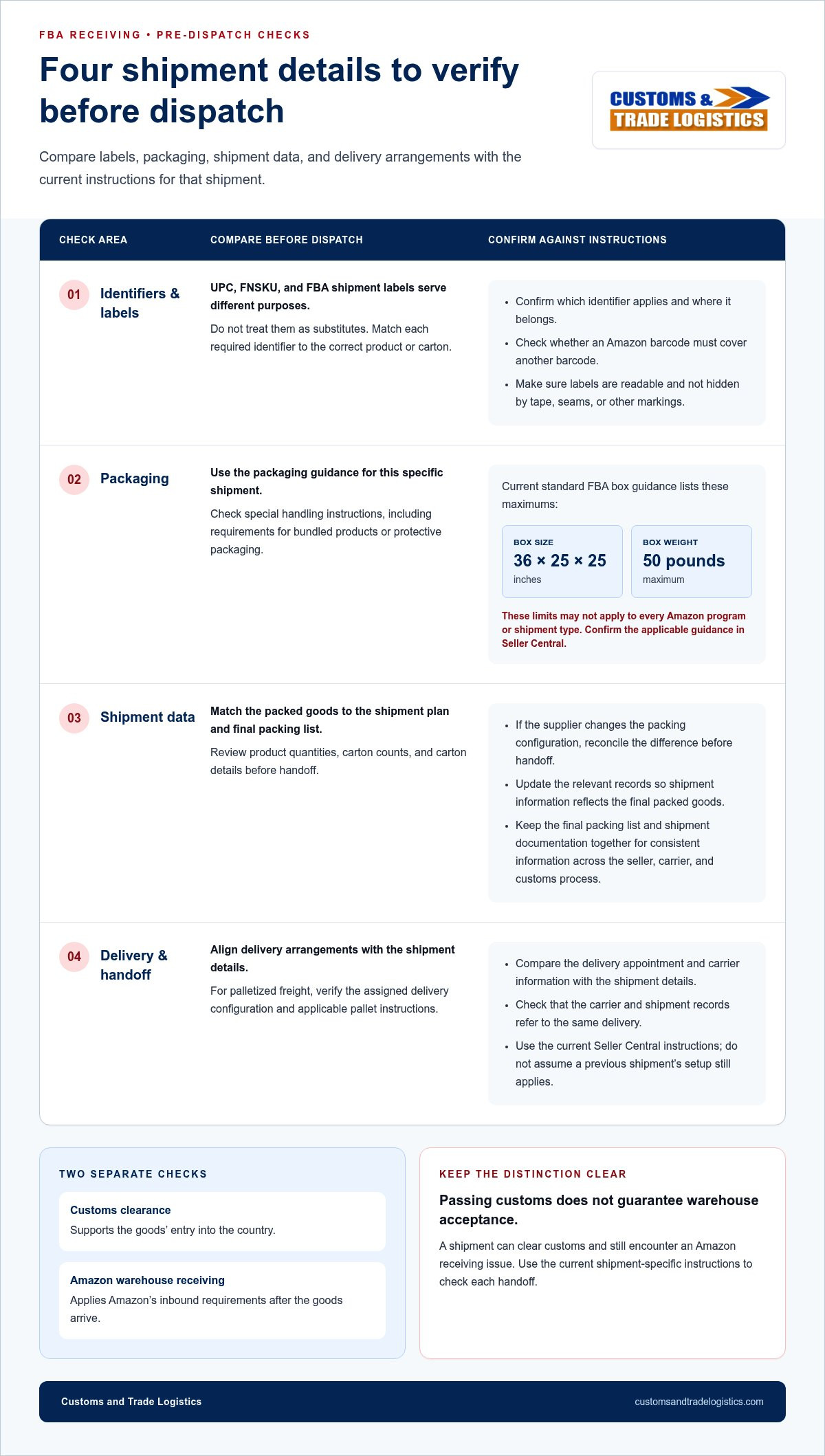
Small discrepancies can create receiving problems: a label that scans poorly, a carton count that does not match the shipment plan, or a delivery configuration that differs from the facility’s instructions. For avoiding FBA shipment rejection at the warehouse, review four areas before goods leave the supplier or consolidation point: identifiers, packaging, shipment data, and delivery configuration.
Amazon’s requirements can vary by product and shipment type, and they can change. Use the current instructions in Seller Central as your source of truth. Do not assume that the setup used for an earlier shipment applies to the next one.
Check product identifiers and carton labels
Start with the labels specified in the current shipment workflow. A UPC, an FNSKU, and an FBA shipment label serve different purposes, so do not treat them as substitutes. Confirm which identifier applies to each product, where labels belong, and whether an Amazon barcode must cover another barcode. Check that every required label is readable, matched to the correct item or carton, and not hidden by tape, seams, or other markings.
Match packaging and shipment details before dispatch
Compare the packed goods with the shipment plan and final packing list, including product quantities, carton counts, and carton details. If the supplier changes the packing configuration, reconcile the difference before handoff and update the relevant records. Keep the final packing list and shipment documentation together so the seller, carrier, and customs process use consistent information.
Next, review the packaging instructions for this specific shipment. For example, current standard FBA box guidance lists a maximum box size of 36 × 25 × 25 inches and a maximum weight of 50 pounds. These limits may not apply to every Amazon program or shipment type, so confirm the applicable guidance in Seller Central before packing. Check any special handling instructions as well, including requirements for bundled products or protective packaging.
For palletized freight, verify the assigned delivery configuration and applicable pallet instructions rather than assuming one standard covers every shipment. Current guidance for LTL or FTL deliveries specifies pallet details, including size, height, weight, and label placement. Confirm those details for the shipment, secure cartons as instructed, and check that the carrier’s booking aligns with the delivery appointment and designated facility.
Use this four-part check before dispatch:
- Identifiers: Match product and carton labels to the current shipment instructions. Confirm they scan and remain visible.
- Packaging: Check box dimensions, weight, protection, and product-specific preparation notes.
- Shipment data: Reconcile unit quantities, carton counts, and shipment-plan details with the final packed load.
- Delivery configuration: Confirm the intended facility, appointment details, and pallet requirements with the carrier.
Resolve mismatches before the freight moves. Accurate paperwork and coordinated transport also matter for the import handoff. Customs and Trade Logistics provides customs clearance, import-document review and submission, and international freight coordination. Sellers who need help with customs documentation and freight arrangements can book a free consultation for import logistics. Check Seller Central for Amazon-specific preparation and warehouse instructions.
FBA Warehouse Acceptance vs. Customs Clearance: Know Which Check Applies
A shipment can be released by customs and still face a problem at an Amazon fulfillment center. These are separate checks with different purposes: customs clearance supports a shipment’s entry into the country, while FBA receiving applies Amazon’s inbound instructions to inventory delivered to its facility. Passing one check does not confirm that the shipment has passed the other.
| Process | Primary purpose | Typical records | Who handles the next action? |
|---|---|---|---|
| Customs clearance | Support the government entry process for imported goods | Commercial invoice, packing list, bill of lading or air waybill, and applicable permits or certificates | The importer and customs broker address entry documentation or customs requests |
| Amazon FBA receiving | Receive inventory according to Amazon’s inbound requirements | Shipment plan, shipment-specific instructions, carton details, and delivery information | The seller addresses Amazon-directed preparation or shipment-plan issues; the carrier handles transport and appointment matters |
Use the relevant notice or instruction to identify which process needs attention. A customs release confirms a step in the import process; it does not confirm that labels, packaging, shipment details, or delivery arrangements meet Amazon’s current receiving instructions. That distinction is central to avoiding FBA shipment rejection at the warehouse.
Which documents belong to customs clearance?
Import documentation commonly includes a commercial invoice, packing list, and bill of lading for ocean freight or air waybill for air freight. Depending on the goods and applicable government requirements, permits or certificates may also be relevant. The exact documents vary, so do not assume every shipment uses an identical set. A customs broker reviews and submits import documentation for customs entry, helping organize this part of the journey.
Which instructions govern Amazon warehouse receiving?
For warehouse receiving, use the current, shipment-specific instructions in Amazon Seller Central. These govern Amazon’s inbound process, not customs entry. Keep ownership clear: the seller oversees product preparation and Amazon shipment details, while the carrier coordinates transport and the delivery appointment. Customs documentation belongs to the import-entry process. Matching shipment identifiers and records across each handoff helps everyone act on the same details.
International freight coordination connects these stages without merging their responsibilities. Import-document review supports customs entry; freight coordination organizes movement between handoffs; delivery and redistribution support onward movement. For sellers planning a shipment from overseas, Amazon Seller Import Help: The 2026 Guide to FBA Freight Forwarding Services and Customs Clearance Services in the US: The Complete Importer’s Guide for 2026 are relevant companion guides. Their topics reflect two connected but distinct parts of the route.
If a shipment is held at the border, focus first on the customs or import-document issue. If Amazon flags receiving, follow the current Seller Central instructions. Clear ownership prevents a problem from being passed between teams without a defined next step.
Pre-Dispatch FBA Shipment Checklist: Verify Every Handoff
A reliable pre-dispatch check follows the cargo from supplier to carrier, through customs documentation, and toward Amazon. Complete these steps before authorizing the shipment to move. Amazon’s requirements and shipment instructions can change, so use current Seller Central guidance for the specific plan.
Seller and supplier checks before cargo handoff
- Confirm product identifiers and labels. Compare each product’s required barcode and label placement with the current shipment instructions. Check that labels are readable, matched to the goods, and visible after packing.
- Verify preparation and packaging. Review the applicable product and shipment requirements in Seller Central, including special handling notes. Do not assume instructions from a previous shipment apply to this one.
- Reconcile the physical load. Compare unit quantities, carton counts, and carton or pallet details with the shipment plan and final packing list. If the supplier changes the packed quantity or configuration, resolve the difference and update the relevant records before handoff.
- Keep useful evidence. Retain the final packing list and shipment records. Photos of packed cartons or pallet configuration can help clarify a later discrepancy, especially if the cargo’s condition or arrangement is questioned.
Carrier and import-document checks before dispatch
- Align delivery details with the carrier. Provide the carrier with the destination and appointment instructions that apply to this shipment. Confirm its booking and transport records refer to the correct shipment and facility.
- Review import paperwork for consistency. Compare the commercial invoice, packing list, and applicable transport document, such as a bill of lading or air waybill. Check that shipment identifiers, goods descriptions, and quantities align across the records. Include applicable permits or certificates based on the goods and current government requirements.
- Assign owners to each handoff. Identify who is responsible for Amazon shipment details, carrier coordination, and customs documentation. Keep a record of document submissions and key communications so the next person can see what was sent and when.
Final release-to-ship review
Before cargo leaves the supplier or consolidation point, compare four records: the Amazon shipment plan, the physical cartons, the carrier’s freight records, and the import paperwork. Confirm they describe the same shipment. Consistent identifiers and matching quantities, carton details, and destination information reduce avoidable discrepancies at each handoff.
Pause dispatch if a mismatch remains. Correct the relevant record or cargo detail first, rather than relying on receiving staff to reconcile it after arrival. Check customs filing deadlines against current official guidance; this checklist does not set or replace a deadline.
This process supports avoiding FBA shipment rejection at the warehouse, while keeping customs and transport tasks distinct from Amazon’s product-preparation instructions. For help coordinating import documents and freight handoffs, book a free consultation for import guidance.
Handling FBA Rejections: How Logistics Support Helps
A rejection notice can feel urgent, but a steady response helps you avoid correcting the wrong part of the shipment. First establish what Amazon has flagged, then assign the next action to the party responsible. A warehouse instruction, a carrier delivery issue, and a customs documentation question require different responses. No single party controls every step of an international shipment.
Respond to the rejection in a controlled sequence
- Preserve the notice. Save the message and record its date, shipment identifier, stated reason, and instructions. Match it to the shipment plan, delivery appointment, carrier records, and affected cartons or units.
- Identify the issue and owner. Determine whether the notice calls for an Amazon-directed correction, a carrier or freight action, or attention to customs entry documentation. Keep the responsibilities distinct.
- Follow the current instructions. For an Amazon receiving issue, use the direction shown in Seller Central and verify the requirements that apply before making changes or arranging another delivery. For a carrier issue, coordinate through the transport handoff. For a customs matter, address the relevant entry documentation or request.
- Record what changes. Keep copies of communications, corrected records, and revised delivery details. This gives everyone working on the shipment a clear account of what has been addressed and what remains open.
Do not assume that fixing one reported problem guarantees acceptance on a later delivery. Follow the instructions for the specific shipment and keep evidence that the correction was made.
Bring in customs and freight expertise for the import leg
Customs and Trade Logistics supports the import journey through customs clearance, import-document review and submission, international freight coordination, and delivery redistribution. As a Licensed U.S. Customs Broker, the company helps with customs-entry documentation and coordination. Its nationwide customs clearance service covers all U.S. ports. Many shipments are cleared within 24 hours, though clearance timing depends on the shipment and circumstances.
These services support the route to FBA, but they do not replace Amazon’s product-preparation or warehouse receiving instructions. A customs broker addresses customs-entry matters; a carrier manages its transport responsibilities; and the seller remains responsible for Amazon-directed preparation and shipment-plan actions. Clear ownership keeps these separate workstreams moving without suggesting that customs release resolves a warehouse issue.
With over 35 years of industry experience, Customs and Trade Logistics helps businesses manage import paperwork and freight handoffs. Sellers who need guidance can book a free consultation to discuss their shipment logistics and customs needs. For support with the import leg of your FBA shipment, discuss your FBA import logistics with our professional team.
Make Your Next FBA Shipment Easier to Manage
Turn avoiding FBA shipment rejection at the warehouse into a repeatable release-to-ship habit. Before each dispatch, assign an owner to every handoff and keep one current record set for the shipment. This makes it easier to spot gaps early and respond with the right information if plans change.
For your next shipment, consider where you need support: import paperwork, customs coordination, freight movement, or delivery redistribution. Customs and Trade Logistics brings over 35 years of industry experience as a Licensed U.S. Customs Broker serving all U.S. ports. Free consultations are available to prospective clients.
Book a free consultation about your import logistics to discuss the import leg of your FBA shipment. With a clear plan and responsibilities in place, you can move forward with greater confidence.
Frequently Asked Questions
Can Amazon reject an FBA shipment after it reaches the warehouse?
Yes. A carrier’s delivery confirmation shows that freight reached a location, not that Amazon accepted the inventory into its network. Check the shipment’s status in Seller Central and read any facility message before deciding what happened. For example, a delivery marked as received may still have units awaiting processing, while a specific rejection notice calls for a response based on its stated reason.
What are the most common reasons an FBA shipment is rejected?
Common risks include labels that are incorrect or difficult to scan, packaging that does not follow the shipment’s applicable instructions, differences between planned and packed quantities, pallet configuration issues, and delivery coordination problems. A mismatch might be as simple as a packing list showing a different carton count from the physical load. Requirements vary, so use a general checklist to guide your review, then verify specifics in Seller Central.
Does customs clearance mean Amazon will accept my FBA shipment?
No. Customs clearance addresses the import-entry process, while Amazon evaluates inventory under its own receiving instructions. A customs release does not verify that carton labels are readable or that shipment details match Amazon’s plan. Keep import records and Amazon shipment records organized separately, then compare shared details such as product descriptions and quantities. This helps identify whether a question belongs to the border process or warehouse receiving.
How can I check FBA labels before shipping inventory?
Open the shipment’s current instructions in Seller Central and compare them with a sample of the packed units and cartons. Check that the requested identifier appears on the correct item or box, is legible, and will not be covered by tape or another label. UPC, FNSKU, and shipment labels have different roles. If a supplier applies labels, provide the exact shipment instructions and review the finished goods before dispatch.
What should I do if an Amazon warehouse rejects my shipment?
Start by saving the notice and noting its shipment identifier, date, and stated reason. Then compare it with the plan, delivery records, and packing information to see whether the issue affects all inventory or only part of the load. Follow the correction instructions in Amazon’s systems, assign each task to the responsible party, and document what changed. Before rescheduling or moving freight, review the current instructions for that shipment.
Can a customs broker help prevent FBA warehouse rejection?
A customs broker can help with import documentation and customs entry, but that work does not replace Amazon’s preparation or receiving requirements. Customs and Trade Logistics supports customs clearance and international freight logistics for businesses importing goods. Use Seller Central for Amazon-specific instructions and address import questions through the appropriate customs process. A free consultation can help clarify the customs and logistics steps relevant to an FBA-bound shipment.
What documents are commonly needed to clear an imported FBA shipment?
Common import records include a commercial invoice, packing list, and bill of lading or air waybill. Depending on the goods and applicable government requirements, permits or certificates may also be needed. For example, details about the goods and quantities should be consistent across the invoice and packing list. A customs broker can review and submit documentation for customs entry; confirm shipment-specific document needs before dispatch.